You build with Flutter, and you've already added an AI feature or two.
02
That "AI feature" is a chatbox that answers with a wall of text.
03
You want the model to actually do things in your app — not just talk.
04
You like to ship.
FIG. 01 — AI IN OUR APPS TODAY
We bolted a chatbot on. And called it AI.
What we ship
a paragraph to read
vs
What people wanted
✓ PaneerOnion✓ 10 min
Quick Paneer Wrap 10 min · easy
View recipe
You ask a question. You get back text. You still have to read it, decide, and go tap the real UI yourself.
THE TURN
What if the model could hand you the screen — not just describe it?
THE SHIFT
From routes you draw to screens it builds.
BEFORE
You designed every screen
Every screen drawn, every route wired by hand. The journey can only go where you predicted it would.
WITH GENUI
The model assembles them
You register the widgets; the model composes the screen for what was actually asked — and rebuilds it as the conversation moves.
THE IDEA
Generative UI: the model builds the interface.
Instead of replying in text, the model assembles real, interactive widgets — cards, chips, forms — out of your design system, shaped by what the person actually asked for.
They get a screen to use. Not a transcript to read.
THE TOOL
The Flutter GenUI SDK
An experimental package from the Flutter team. It lets the model build your app's UI at runtime — from widgets you own, in your brand.
You decide how everything looks. The model decides what to show.
⚠︎ It's early. The API still changes between versions — pin your version and expect to refactor.
THE WHOLE MODEL
Three ideas. That's it.
01
The catalog is the contract
The model can only use widgets you register. Not in the catalog? It can't use it. Your design system, enforced at runtime.
02
It returns JSON, not code
The model describes the UI as data. Your app turns that into real, native Flutter widgets.
03
Interactions loop back
A tap or a pick goes back to the model, which updates the screen. That loop is what makes it generative, not just dynamic.
A FAIR QUESTION
Why JSON — and not code?
Safe
The model never runs code on your client. It sends data describing pre-approved components — nothing to inject, nothing to execute.
Native
That JSON maps to your widgets. Your fonts, spacing, theme. It looks like your app because it is your app.
Streamable
Flat JSON arrives piece by piece, so the UI builds as the model thinks — no waiting for one perfect blob.
NOT A FLUTTER-ONLY IDEA
One model response. Many front-ends.
Underneath sits an open protocol. The same response can render on Flutter, React, Angular, or native — each drawing with its own components.
Apache-2.0, built by Google with the open-source community. Flutter is one renderer that speaks it.
THE PROTOCOL UNDERNEATH
A2UI — a shared language for UI
(Agent-to-User Interface)
A2UI lets a model send an interface safely across a trust boundary: not text, not code, but a declarative description the client renders with its own widgets — natively across web, mobile, and desktop.
FIG. 02 — THE INTERACTION LOOP
Round and round.
Each turn, the screen gets closer to what they meant.
SO I BUILT ONE
Meet Sage.
A cooking assistant. Tell it what you feel like — "something quick with paneer" — and it builds the screen: preference chips, recipe cards, a full recipe you can tweak. Plain words in, a usable screen out.
One thing to hold onto: the app owns the facts, the model owns the words.
REC · THE DEMO
Let's cook.
Watch the screen rebuild itself each turn. Nobody designed these exact states — the model assembled them from my widgets.
01
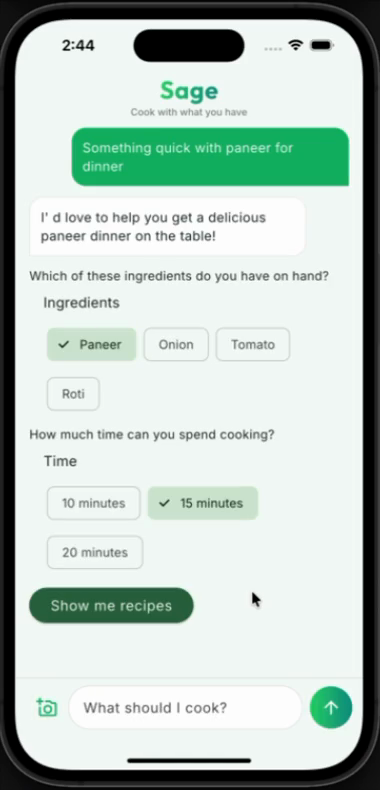
Ask for something — "quick dinner with paneer"
02
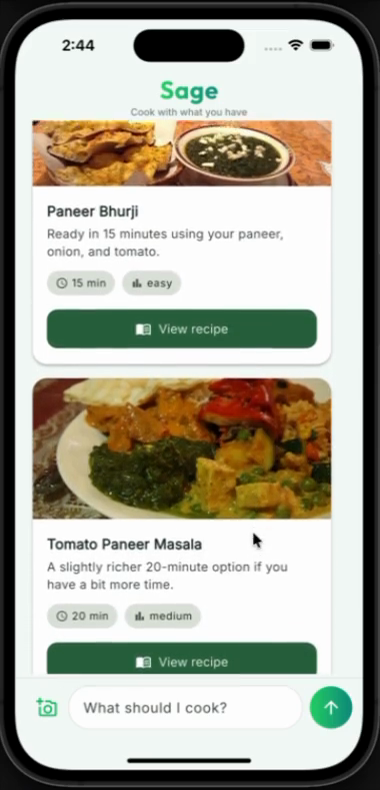
Chips gather what's on hand → recipe cards appear
03
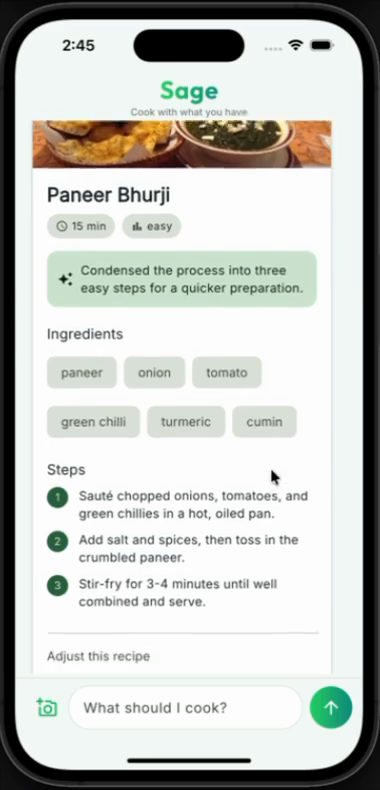
Tap a card → the full recipe builds out
04
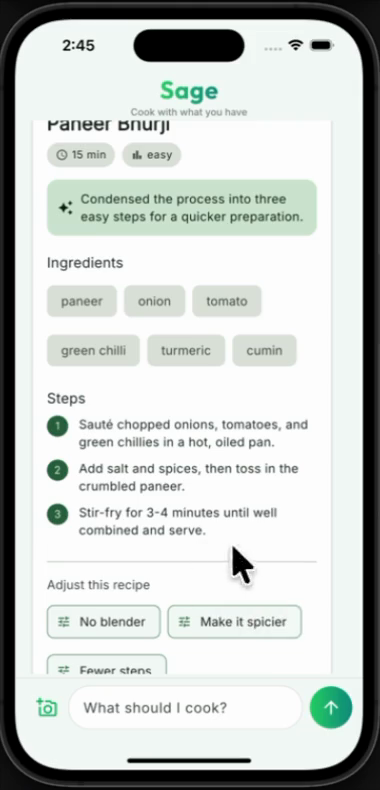
Say "no blender" → it rewrites the steps in place
THE DEMO, FRAME BY FRAME
Four turns, four screens.
1 · GatherChips collect what's on hand and how long you've got.
2 · SuggestRecipe cards built from your data — not invented.
3 · CookTap a card → the full recipe, image and steps.
4 · Adapt"No blender" → it rewrites the steps and tells you why.
WHAT JUST HAPPENED
It never invented a recipe.
It chose from the recipes I gave it, and adapted only the language — the steps, the tone. The cook times and ingredients came straight from my data.
That split — model for words, app for facts — is the quiet trick behind the whole thing.
THE BUILDING BLOCKS
How it all fits together.
Follow one turn, top to bottom — each piece hands off to the next, then loops back.
1
Conversation
The orchestrator — runs the turn-by-turn loop between the person, the model, and the screen.
2
Transport + A2UI
The line to the model. It streams the reply back as A2UI — a declarative description of UI as data, never code.
3
Catalog
The contract — the only widgets the model is allowed to use.
CatalogItemname·dataSchema·widgetBuilder
4
Surface
Where a reply renders as real, native widgets from the catalog — a fresh surface each turn, so nothing overwrites the last.
5
Data model & binding
The schema-checked data the model sent fills each widget; a tap or pick dispatches an event…
↺ …straight back to the Conversation → the next turn.
CODE 01 — THE CONTRACT
A widget the model is allowed to use
recipe_card.dart
final recipeCardItem = CatalogItem(
name: 'RecipeCard',
// The schema only accepts an id — not a title, not a price.// The model can point at a recipe, never invent one.
dataSchema: S.object(properties: {
'recipeId': S.string(),
'reason': S.string(), // the one thing it may write freely
}, required: ['recipeId']),
widgetBuilder: (ctx) {
final recipe = recipeById(ctx.data['recipeId']);
return RecipeCard(recipe: recipe); // your widget, your brand
},
);
name + schema + builder. The schema is the leash — it's how you stop the model hallucinating recipes that don't exist.
CODE 02 — FACTS vs WORDS
App owns facts. Model owns words.
recipe_view.dart
final recipe = recipeById(recipeId); // FACTS: from my datafinal modelSteps = data['steps']; // WORDS: from the model// Use the model's adapted steps if it sent any —// e.g. "no blender" — otherwise fall back to mine.final steps = (modelSteps != null && modelSteps.isNotEmpty)
? modelSteps
: recipe.steps;
The model rewrites the phrasing. The cook time, the ingredients, the image — those are never up for negotiation.
CODE 03 — THE SEAM
Swap the model in one file
recipe_backend.dart
// No API key in the app — Firebase AI Logic holds it.
_model = FirebaseAI.googleAI().generativeModel(
model: 'gemini-3.1-flash-lite',
systemInstruction: Content.system(buildSystemInstruction()),
);
// genui just needs streamed text. Feed each chunk in.await for (final res in chat.sendMessageStream(content)) {
_adapter.addChunk(res.text); // the backend-agnostic seam
}
genui doesn't care which model you use. Change providers later and this is the only file you touch.
FIG. 03 — THE PART TALKS SKIP
What the happy path doesn't tell you.
Four things I learned building this — the kind you only find out by shipping.
TRADEOFF 01
The fence cuts both ways.
Locking the model to your data kills hallucination. It also means the moment someone asks for something you don't have, it has nothing honest to say.
Ask for a burger from a paneer menu, and a naive build will force paneer on you. You have to teach it to say "I don't have that — here's what I can do."
TRADEOFF 02
Decide who owns the truth.
The model is wonderful with language and careless with facts. So don't ask it to remember your prices or your inventory.
Let it own the words. Let your app own the facts. Once you draw that line, a lot of scary failure modes just… disappear.
TRADEOFF 03
Cleaning up the screen is your job.
Generative UI keeps adding. Nothing gets tidied unless you tidy it. And the model controls each screen's identity — a smaller model that reuses an id will quietly paint over your last one.
Model quality isn't abstract here. It shows up directly in your UX.
TRADEOFF 04
It's a chattier loop than a chatbot.
One thing the person does can be several model calls — gather, show, refine. So you hit rate limits sooner than a plain chat app would.
Pick your model tier with that in mind, and design your "thinking…" states for real.
NOT JUST MY DEMO
GenUI in the wild.
Sage is my weekend toy. But this isn't a lab trick — over the past year, real teams have shipped real GenUI apps.
Three worth knowing: one from the Flutter team, one from a top agency, and one from a solo GDE.
01
GenLatte — the Flutter team's playful Gemini demo
02
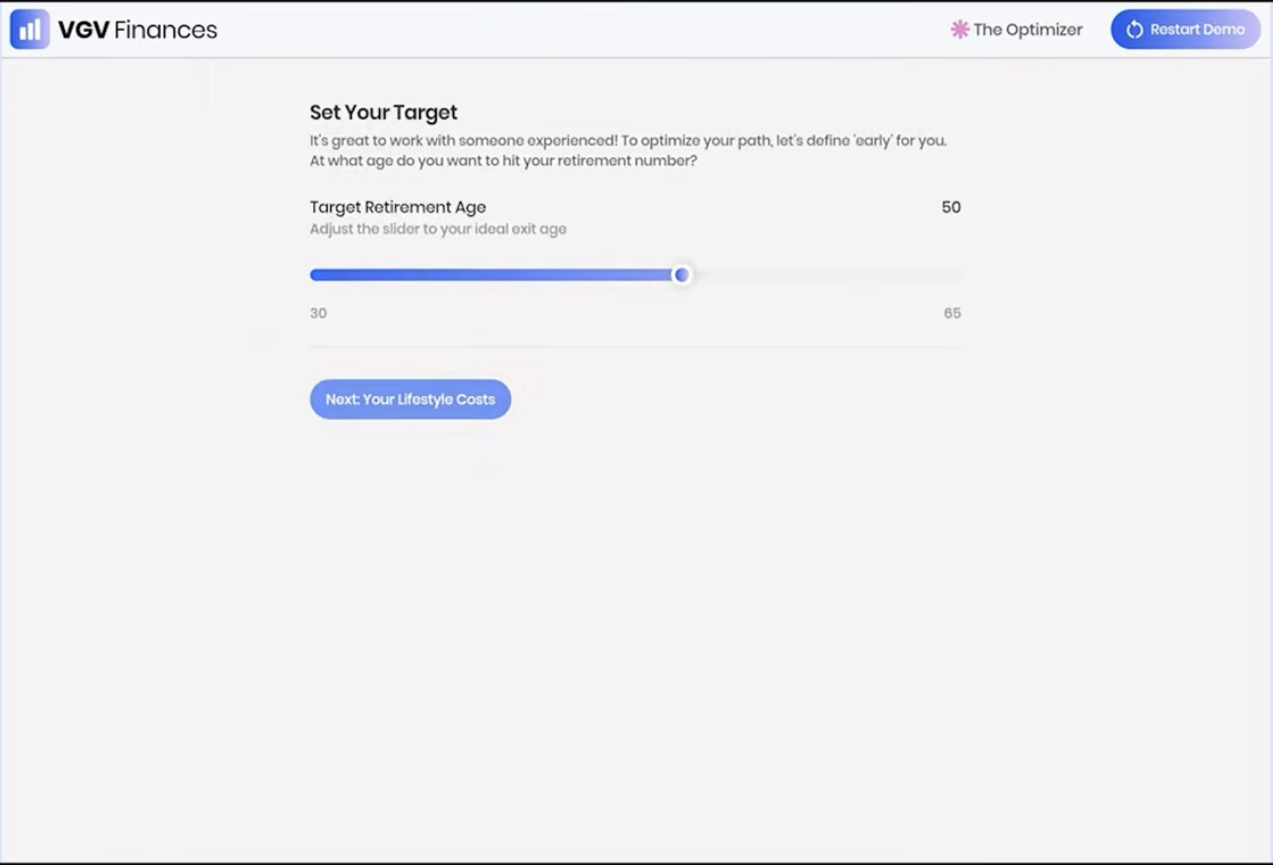
VGV Finances — Very Good Ventures, at Google Cloud Next ’26
03
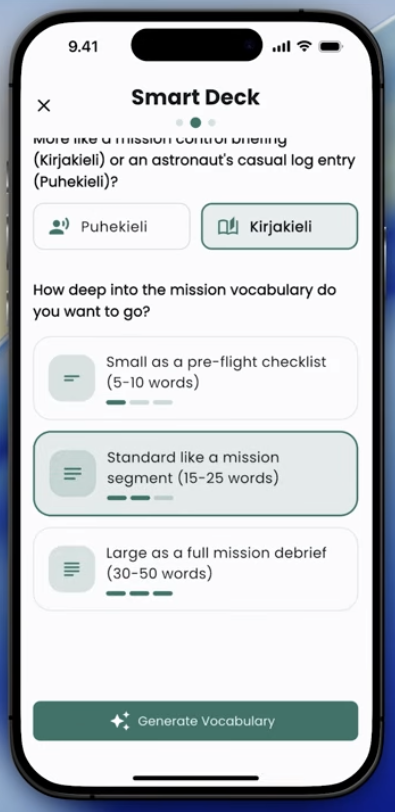
Finnish it — a Flutter GDE's app, shown live at Google I/O ’26
GENUI IN THE WILD · 1 OF 3
GenLatte
The Flutter team's own GenUI demo. A couple of playful taps, and Gemini composes a personalized latte — Dash dreams it up while the screen assembles itself.
Flutter teamGeminiGenUI demo
GENUI IN THE WILD · 2 OF 3
VGV Finances
Very Good Ventures' AI financial planner, built for Google Cloud Next 2026. Ask about a goal — “retire by 50?” — and it renders sliders, charts and chips on the fly. The model builds the screen, not a paragraph.
Very Good VenturesCloud Next ’26Firebase AI
GENUI IN THE WILD · 3 OF 3
Finnish it
A language-learning app by Flutter GDE Cagatay Ulusoy. Each lesson's UI is generated on the fly to fit the drill — and it was shown live in the Google I/O “What's new in Flutter” session.
Flutter GDEGoogle I/O ’26Community
A HONEST RULE OF THUMB
When to reach for it.
Great fit
When the screen should change with intent — exploring, deciding, narrowing down, or taking in a photo / voice / messy input.
Probably overkill
A static form. A settings page. A fixed flow you already know. A good plain screen still wins more often than people admit.
A chatbot that builds UI isn't always the answer. Use it where the uncertainty lives.







 akanshajain.dev
 LinkedIn
 Flutter Delhi
 FFDG New Delhi